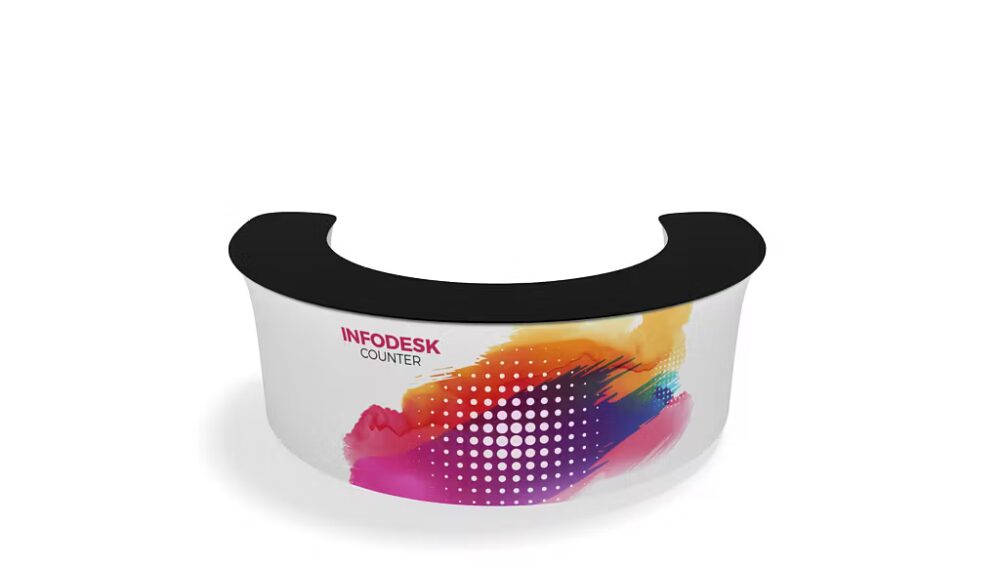
Step-by-Step Guide: How to Assemble the WaveLine® InfoDesk in Minutes
General Information
The WaveLine® InfoDesk is a compact, portable exhibition counter designed for fast assembly and professional presentation. Whether you are preparing for a trade show, pop-up event, or in-store demo, this counter gives you a friendly trade show presence quickly. In this guide you will learn each step so you can set up confidently and efficiently.
Product Highlights
The InfoDesk stands out because it combines lightweight construction with a sleek, modern look. Furthermore, the system features a tool-free frame, magnetic connector points, and a pre-printed or printable graphic wrap. As a result, you get a polished display in minutes rather than hours. If you prefer a counter-style solution with a different form factor, consider complementary options like Brandcusi® Counters for additional configurations and sizes.
Specifications
Key specifications to note before you begin assembly include overall dimensions, weight, and storage case size. Typically, the assembled InfoDesk measures approximately 100 cm wide by 90 cm high and 40 cm deep, while the packed case fits within standard airline and courier limits. Moreover, the aluminum frame keeps the weight manageable so single-person setup is feasible.
Components
Before assembly, confirm you have each component. The package normally contains:
- Collapsible aluminum frame
- Magnetic connector strips
- Graphic wrap with hem and adhesive
- Countertop surface
- Quick-lock feet or stabilizers
- Carry case with foam inserts
Furthermore, lay out the pieces on a flat surface to make the process smoother and to avoid misplacing small parts.
Design Features
The InfoDesk’s design emphasizes ease of use and visual impact. For example, the magnetic strips align the graphic perfectly, while the curved frame creates a modern profile that attracts attention. Additionally, the countertop attaches with simple clamps so you can place promotional materials or a tablet immediately. Consequently, the appearance remains professional without complicated assembly steps.
Portability
Portability is a core benefit, and the InfoDesk packs down into a compact case for transport. Because the frame is lightweight and the case includes handles and wheels, you can move between venues with minimal effort. Also, the quick setup means you save on labor costs, and therefore you get lower overall event expenses compared to bulkier counters.
Setup Process
Follow these steps to assemble the WaveLine® InfoDesk in minutes. First, open the carry case and remove the frame and components. Next, expand the collapsible frame until the magnetic connectors click into place. Then, attach the graphic wrap around the frame and secure it using the provided adhesive hem or Velcro. After that, place the countertop on the top of the frame and lock the clamps. Finally, attach the quick-lock feet and position the desk on your preferred spot. As a result, your counter is ready for use and you can focus on engaging visitors.
Conclusion
In summary, the WaveLine® InfoDesk offers quick assembly, elegant design, and reliable portability for exhibitors who need a professional presence on short notice. By following the steps above you will complete setup quickly and with confidence. Ultimately, the combination of smart components and intuitive design means you spend less time building and more time connecting with customers.